Research Tender Awards Without Mistaking an Estimate for a Contract
Trace a notice to an award and contract using official procurement data, with a worksheet for identifiers, value types and coverage gaps.
At a glance
Trace records by issuer and procurement identifiers, distinguish tender estimates from award and contract values, and record missing or amended data rather than treating it as a complete market history.
This is independent guidance from TenderSearch SA, not advice from a government authority. Verify current requirements with the issuer and these official references: National Treasury Transparency Portal: coverage, downloads and licensing · National Treasury eTenders: official notices.
Start with a research question
Award research is useful when the question is specific: which requirements were actually awarded, how often a buyer procured a service, or what contract duration was published? It becomes misleading when every number is treated as a comparable price. Begin with one buyer, service and period. Write down whether you need tender notices, award decisions, signed contracts or final expenditure; those are different evidence targets.
The National Treasury Transparency Portal offers monthly procurement data in Open Contracting Data Standard formats and a versioned API. Its homepage explicitly says the published material includes only a subset of public procurement data captured on eTenders. Missing records therefore cannot prove that an institution never bought something or that a supplier never won work.
Follow identifiers, not just titles
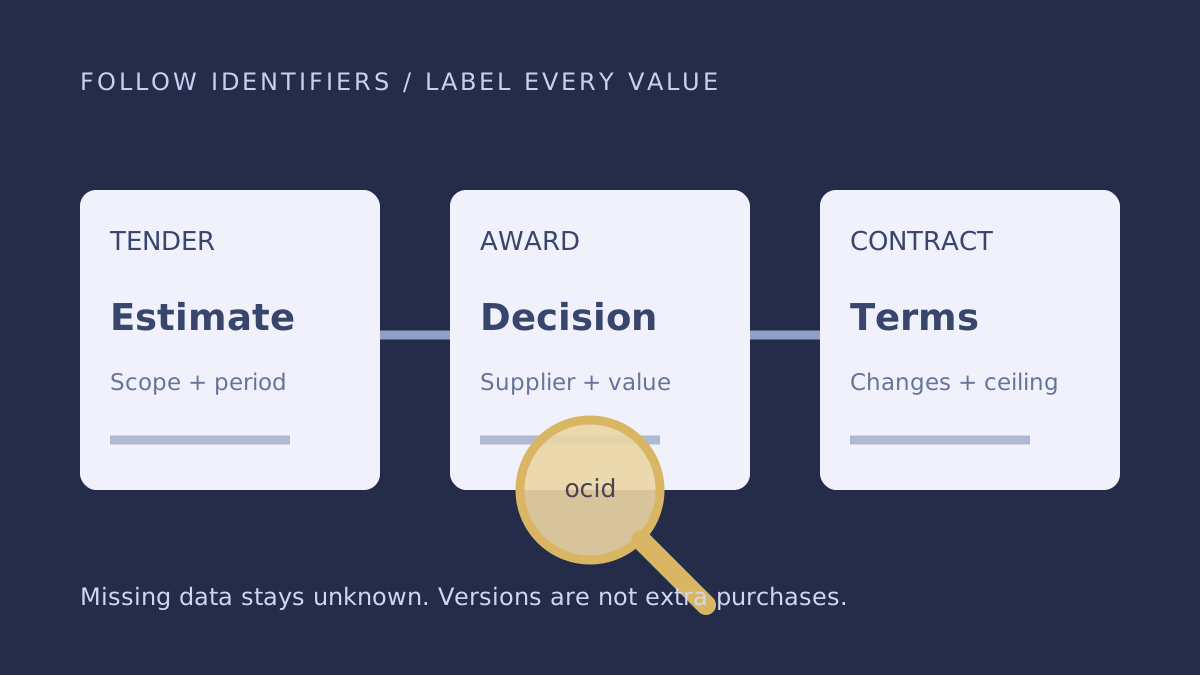
Capture the issuing entity, tender reference and any procurement-process identifier present in the dataset. OCDS uses an Open Contracting ID, commonly called an ocid, to connect information about a contracting process. Preserve identifiers as text so spreadsheet software does not remove leading zeroes or convert year-like references into dates.
Move from the tender record to associated awards and then contracts where available. Do not join records solely because two titles contain the same words. A repeat purchase, a cancelled advert and a re-advertisement can have almost identical descriptions. Conversely, a single procurement process can contain multiple awards or contracts.
When exporting, retain the download date, source file and relevant release identifiers. If a newer release changes a value or status, keep both the older evidence and your explanation of the change. Do not sum every release as though each version were another purchase.
Give every value a label
Your research sheet should include value type, amount, currency, tax treatment if known, quantity, duration, lots and whether the figure is a ceiling, estimate or committed amount. A three-year panel ceiling cannot be compared directly with one supplier's monthly invoice. An award amount may cover several locations or optional work that was never ordered.
Illustrative example: a plan contains an estimated R2 million requirement, an award records R1.6 million and a later contract amendment records R1.8 million. These are not three separate contracts worth R5.4 million. They are potentially different stages or versions of the same process. Confirm the identifiers and amendment scope before choosing a figure for your analysis.
Keep comparability and coverage notes
For each comparison, record what you could not establish: exact specifications, included maintenance, taxes, delivery distances, escalation, final quantities or whether the contract was fully performed. A low historic total is not evidence that today's specification can be delivered profitably at that price. Use your own current cost model rather than copying a winner's headline amount.
Avoid describing an incumbent as exclusive or implying improper conduct from a repeated award pattern alone. Procurement data can identify questions worth researching, not establish motives. Check the underlying documents and ask the issuer for clarification through appropriate public channels when the publication is unclear.
Audit a sample before drawing conclusions
Choose a few records from your working sheet and manually trace each back to its official source. Check that the issuer, process identifier, value type and latest relevant version match your export. Look for duplicated lots, cancelled outcomes and missing currencies. Record any corrections in a small cleaning log. This quality check is particularly important when spreadsheet joins or automated grouping have combined files from more than one month.
Publish a reproducible finding
A useful research note states the question, dataset and extraction date, filters applied, identifiers checked, exclusions and limitations. If you reuse the Treasury download data, follow the portal's stated Creative Commons BY 4.0 attribution requirements and distinguish your analysis from Treasury's own publication. Do not imply government endorsement of your conclusions.
Finish with a practical action: monitor the buyer's next procurement, investigate capability gaps, or request a missing published document. Leave unknown outcomes as unknown. An independent discovery service and the official portal can complement one another, but neither should be described as a complete record of every South African government award without evidence of that coverage.
- Preserve source and process identifiers.
- Separate estimates, awards, contracts and expenditure.
- Check versions before summing.
- Normalise scope, duration and tax treatment.
- State coverage and attribution.
Frequently asked questions
Is an award value the supplier's final revenue?
Not necessarily. The amount can represent a ceiling, multiple items or a contract later amended. Verify contract terms and expenditure evidence before drawing that conclusion.
Does the portal contain every government award?
No such completeness claim is justified. Treasury describes the portal's publication as a subset of data captured on eTenders.
Found this useful? Share it with another business — it costs you nothing and helps us reach more South African bidders.
Put your bid preparation into practice
Browse public tender previews, check the official requirements, then shortlist opportunities that fit your business. Starter is R149/month for search and saves. Professional at R299/month adds daily keyword email alerts, unlimited saves and closing-date reminders.
Compare tender subscription plans