Procurement Plans: Build a Bid Pipeline Before an Advert Appears
Turn published procurement plans into a monitored pipeline without inventing deadlines or assuming planned purchases will proceed.
At a glance
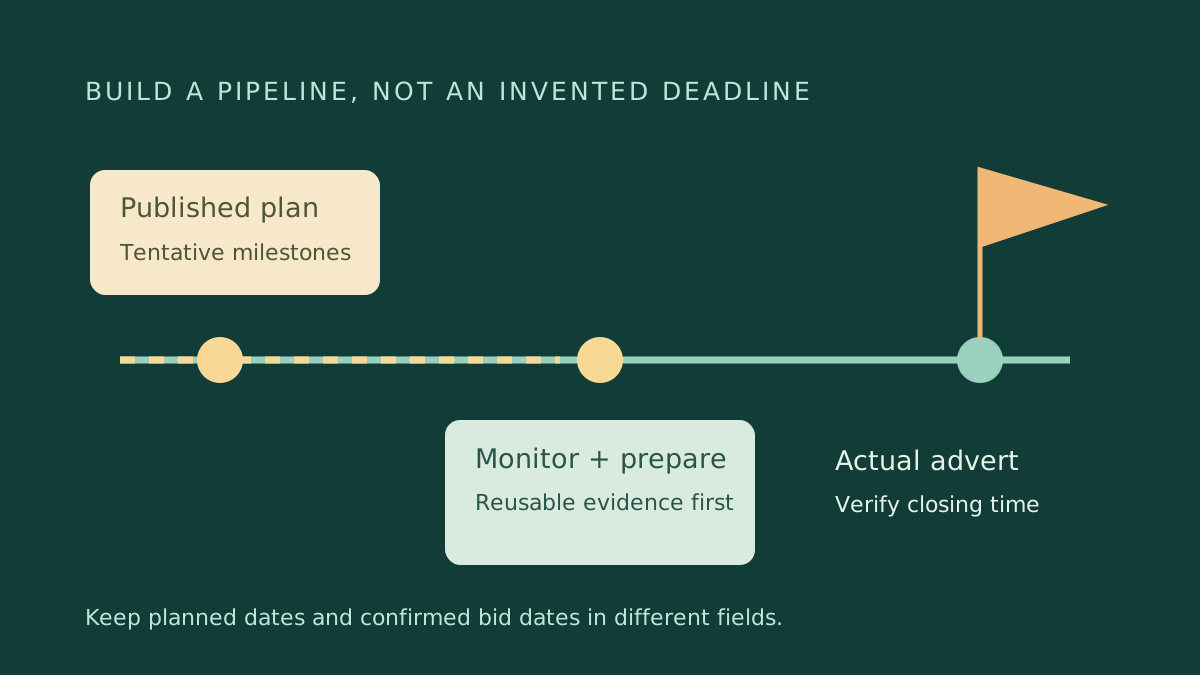
Treat a procurement plan as an early planning signal. Record its tentative milestones separately from actual advertised deadlines, then monitor the issuer for a real notice.
This is independent guidance from TenderSearch SA, not advice from a government authority. Verify current requirements with the issuer and these official references: National Treasury: published procurement plans · National Treasury eTenders: official notices.
A plan creates preparation time, not an invitation
A published procurement plan can describe work a public buyer expects to procure. It is useful for deciding what capabilities, partnerships or product information to prepare before a formal advert appears. It is not itself a tender award, purchase order or assurance that a budget will be spent. A project can move, change scope, combine with another purchase or disappear from a later plan.
National Treasury's eTenders site provides a procurement-plans section with year navigation. Start with the issuer and planning year relevant to your business, then read the actual fields and any attached explanatory notes. Do not transfer a date from a plan into your bid calendar as though it were an official closing time.
Build a worksheet that preserves uncertainty
Create one row per prospective requirement. Include issuer, plan year, plan reference, work description, intended location if stated, tentative procurement milestone, source URL, retrieval date, fit assessment, preparation owner and next review date. Add separate columns for an advertised reference and confirmed closing date; leave those blank until an actual notice supplies them.
Record the wording of uncertain fields. A quarter is not a precise day, and a financial-year label does not necessarily follow a calendar year. If a plan says anticipated, retain that label. Do not invent a tender value, number of lots or compulsory briefing because similar earlier projects had them. Your pipeline should distinguish known facts from your internal estimates.
Use a confidence field for your own monitoring decision, not a probability of winning. For example, 'scope relevant; advert not located' is more defensible than '80% chance of award'. When a colleague reviews the sheet, they should immediately see which dates came from the buyer and which are internal reminders.
Prepare only what is reusable
Before advertisement, gather product specifications, comparable-project evidence, staff availability and realistic supplier lead times. Confirm that registrations and authorisations relevant to your sector are current. Avoid paying for highly bespoke engineering or acquiring stock solely because a plan mentions a potential purchase. Stage preparation spending so it can stop if the requirement changes.
Illustrative example: a provincial plan lists possible facilities-maintenance procurement later in the year. Your team updates reference permissions, maps travel distances and checks specialist availability. It does not assume the future advert will use last year's evaluation rubric. When the real notice arrives, the team compares its assumptions with the published scope and discards work that no longer fits.
Match the plan to the eventual advert carefully
Search the issuer name and distinctive scope terms, not only the plan reference. The advertised tender can use a different identifier or split a broad programme into separate contracts. Compare location, services, duration and institutional unit before marking a pipeline item as matched. Keep the plan reference and tender reference in separate fields so the audit trail remains understandable.
If no advert appears near a tentative milestone, change the monitoring status to 'not located as at [your check date]'. Do not mark it cancelled without an official cancellation. Check later plan versions and the issuer's procurement page. Ask a neutral public enquiry about the publication channel if necessary, rather than requesting privileged details or access to an unpublished specification.
Define the monitoring handover
When a real notice is found, name the person who owns the bid/no-bid review and set an internal review date. Transfer the source links and reusable evidence, but flag every assumption that needs confirmation. Keep the planning row linked to the new opportunity rather than deleting it. That link makes it possible to learn which plan signals were useful without misrepresenting tentative dates as promises.
Run a proportionate monitoring routine
Review high-fit items regularly and low-fit items less often. Keep a version history when descriptions or dates change. At each review ask whether the opportunity still fits your delivery capacity, geographic coverage and appetite for preparation cost. Remove stale items from active work while preserving the source record for future research.
Connect planning to a bid/no-bid decision, not automatic bidding. Once an advert exists, check eligibility, compulsory events, technical criteria, pricing and submission mechanics from scratch. The competitive advantage of plan research is disciplined readiness; it is not advance permission to ignore the eventual rules or a promise that an early enquiry will influence the award.
- Keep tentative and advertised dates separate.
- Save plan year, URL and version.
- Assign one monitoring owner.
- Prepare reusable evidence first.
- Reassess scope and budget after advertisement.
Frequently asked questions
Can I bid directly against a procurement-plan row?
A planning entry is not a substitute for an invitation. Follow the actual procurement notice and authorised participation instructions.
What date should I put in my calendar?
Use internal monitoring reminders for plan milestones. Only label a closing date confirmed when an official advertised notice states it.
Found this useful? Share it with another business — it costs you nothing and helps us reach more South African bidders.
Put your bid preparation into practice
Browse public tender previews, check the official requirements, then shortlist opportunities that fit your business. Starter is R149/month for search and saves. Professional at R299/month adds daily keyword email alerts, unlimited saves and closing-date reminders.
Compare tender subscription plans